QR Code Generation: Complete Guide 2026
How QR codes actually work, how to generate them for free, which error correction levels to choose, and how to print them. Step by step.
A QR code is one of the simplest ways to connect the physical and digital worlds. That's why brochures, business cards, packaging, posters, and even restaurant menus use them. Moreover, once created, a QR code lasts forever — as long as the domain inside it works. Consequently, one correctly made QR code is enough for decades.
What is a QR code and what does it contain?
QR (Quick Response) code is an evolution of the traditional barcode. In particular, unlike a barcode's single dimension, a QR code encodes data both horizontally and vertically. Therefore, it can store significantly more information.
What can you put inside a QR code?
- URL — a web address, e.g.
https://siadesign.ee. The most common use case. - vCard — contact details (name, phone, email, address) saved to a phone with one scan.
- Wi-Fi — network name and password. Consequently, guests can connect without typing.
- Email — opens an email draft with a pre-set address.
- SMS — opens the messaging screen with a number and text.
- Text — any text, up to ~4,296 characters.
- Geolocation — GPS coordinates that open a map.
💡 Key insight:
A QR code doesn't depend on any service or platform. It's simply encoded text.
Therefore, if you create a QR code with the address https://yourdomain.com/offer, the code works
as long as that page is live. In other words — a QR code doesn't "expire" or "break". Domain works = code works.
QR code anatomy: how does a scanner read it?
Before generating codes, it's helpful to understand how a QR code is structured. Specifically, every QR code consists of defined structural elements that the camera detects and decodes.
Core components
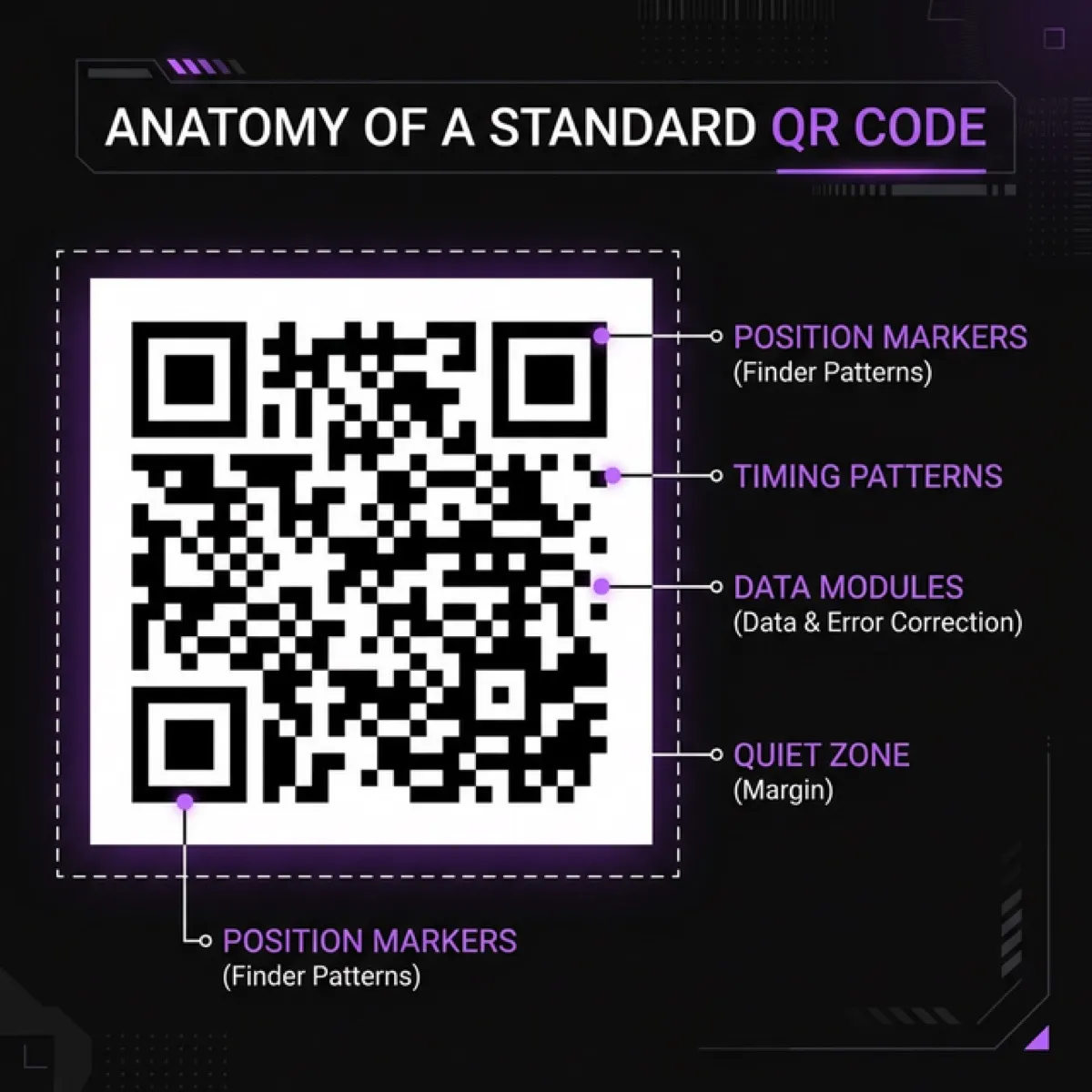
- Position markers (finder patterns) — three large squares in the corners. They help the camera quickly identify a QR code and determine its orientation. Therefore, the code reads correctly even when rotated.
- Timing patterns — alternating black and white squares between position markers. They help the scanner determine the exact size of each data module.
- Data modules — the encoded content itself. Each black or white square is one bit. Consequently, the more data, the more squares and denser the code.
- Quiet zone — empty area around the code (min 4 modules). This is essential! Without it, the scanner may not recognize the code.
- Alignment patterns — in larger QR codes (version 2+), smaller squares appear to help correct curvature.
- Format info — error correction level and mask pattern are encoded directly into the code.
🔍 How the scanner reads:
1. Camera detects the 3 position markers to confirm a QR code is present.
2. Timing pattern helps calculate module size.
3. Format info reveals which error correction is used.
4. Data modules are decoded into bits, then text.
5. Error correction algorithm fixes any corrupted bits.
Consequently, the entire process takes under 100 ms on a modern phone.
Error correction levels
One of the QR code's most ingenious features is built-in error correction. This means that even if part of the code is damaged, dirty, or covered by a logo, the scanner can still recover the data. Therefore, choosing the right error correction level is critically important.
Four levels
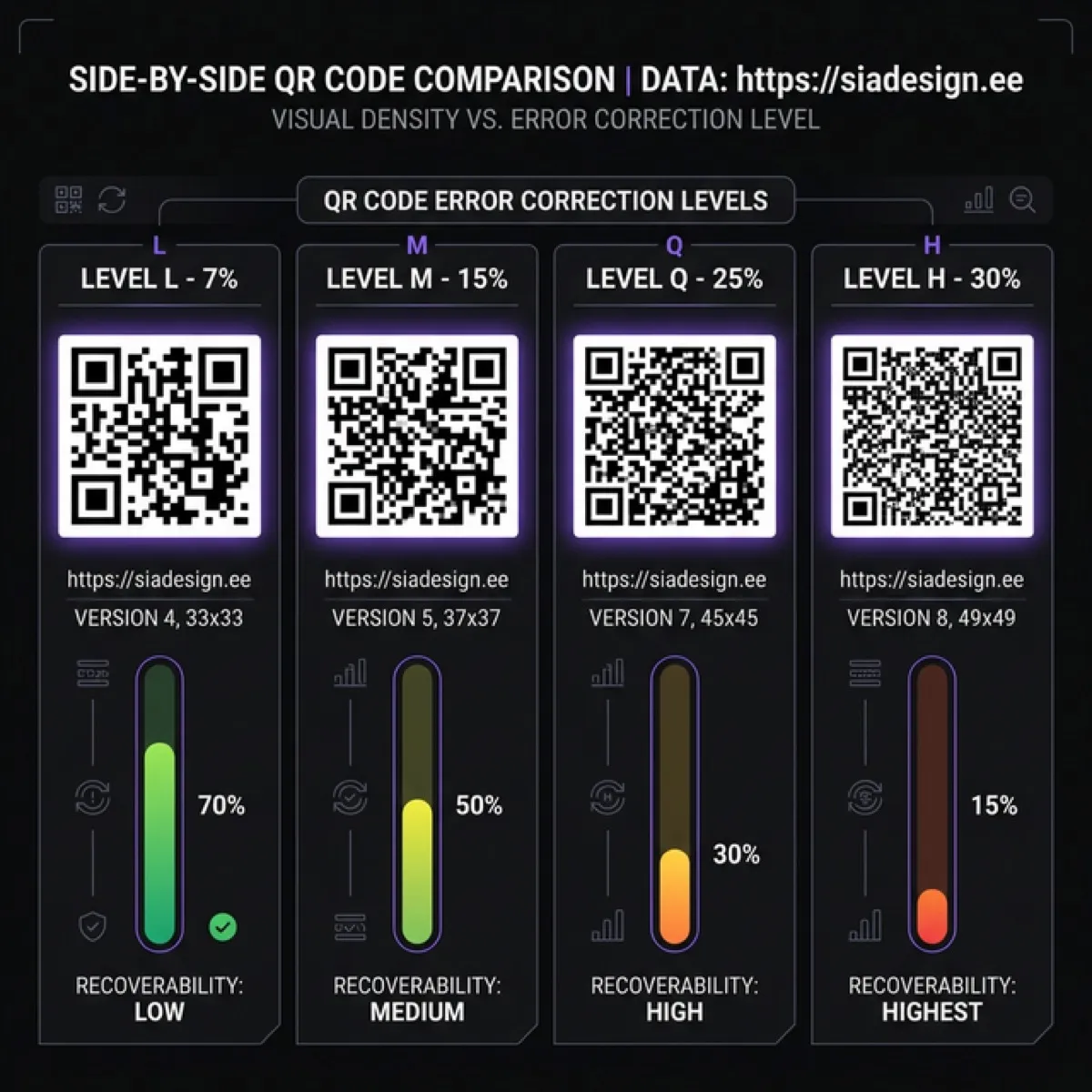
Level L — 7% recovery
Smallest code. Suitable for digital use (screenshots, web), where damage risk is minimal. However, it's the most vulnerable.
Level M — 15% recovery ✅ Recommended
Best balance of size and reliability. Works for most print materials. Therefore, this is the default choice.
Level Q — 25% recovery
When the code is exposed to weather (outdoor posters) or may get dirty. Code size is larger.
Level H — 30% recovery
Required when adding a logo to the center! The logo covers data modules, so the highest error correction is essential. Code is densest and largest.
⚠️ Rule of thumb:
Lower error correction = smaller and cleaner code — but also more vulnerable.
Higher error correction = denser and larger code — but also more resilient.
Therefore, choose M for print and H for logos. L only for digital use.
Free QR code generation: 4 best methods
Now let's get practical. Below are 4 free methods for creating QR codes — from web tools to the terminal.
1. Online generators
- QRCode Monkey — free, ad-free, allows color customization, shapes, and logo embedding. Exports PNG, SVG, PDF, and EPS. Therefore, the best choice for visually customized codes.
- goQR.me — simple and fast. Works for URL, vCard, SMS, and Wi-Fi codes. Exports PNG and SVG.
- Nayuki QR Generator — open-source, technical. Shows code size and version details. Suitable for developers.
2. Terminal (macOS / Linux)
If you have qrencode installed, you can create a QR code with a single command:
The result is a clean qr-code.png file ready for printing. Additionally, you can export as SVG:
3. With Python
The Python qrcode library lets you generate and customize:
4. QR Server API (in browser)
QR Server offers a free API you can use directly in the browser. Simply open this link:
https://api.qrserver.com/v1/create-qr-code/?size=300x300&data=https://siadesign.ee
Replace the data= parameter with your link. You can save and use the image. However, this method
doesn't support logo embedding or visual customization.
QR code customization: colors, logo, shape
Now customization. Many assume QR codes must be black and white. In reality, you can personalize them, but you must follow specific rules to keep the code scannable.
Color rules
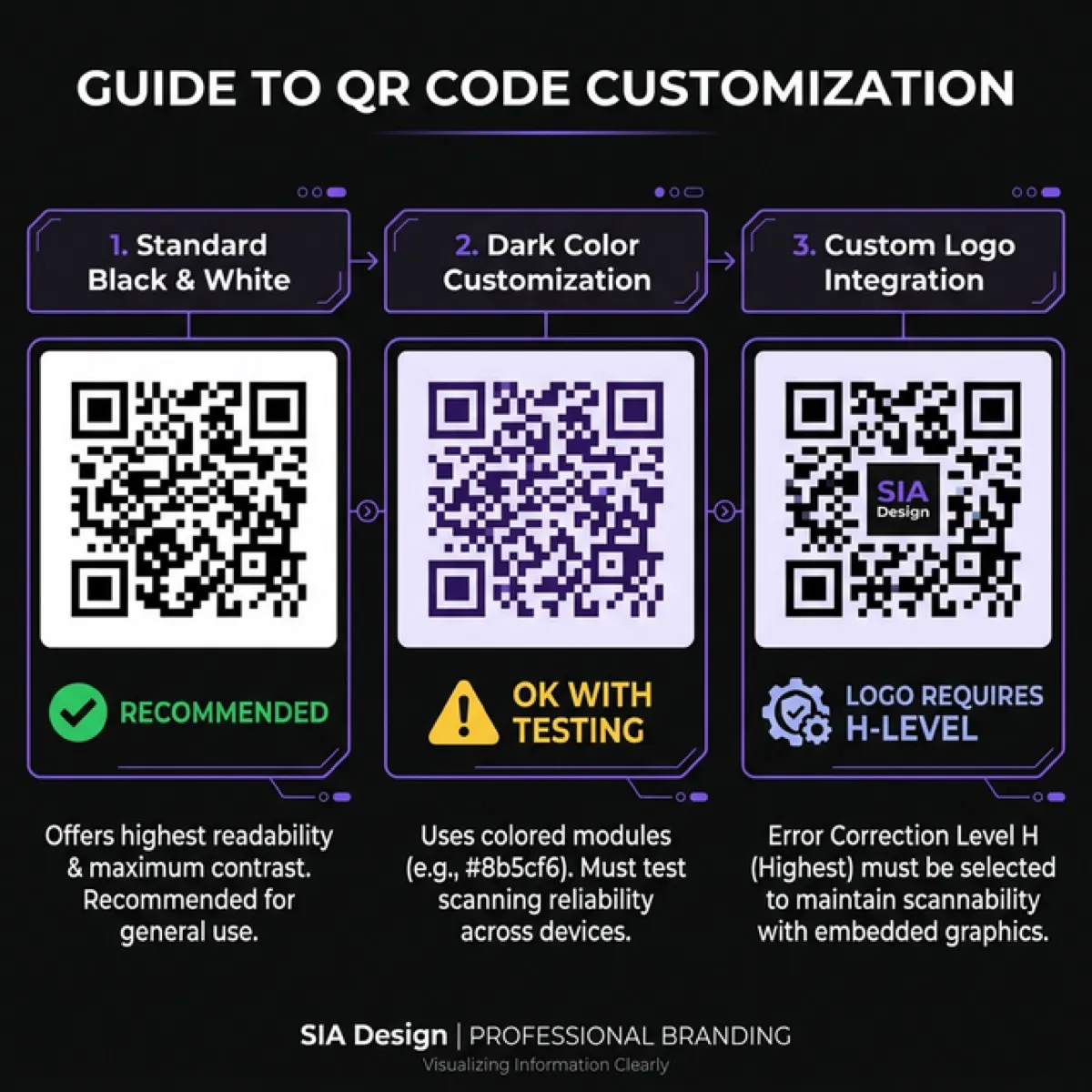
- Dark code, light background — always safe. Black on white = best contrast and readability.
- Dark color (e.g. deep purple, dark green, dark blue) on white — works with most scanners. However, always test before printing.
- Light code on dark background — risky! Many scanners only read dark on light. Therefore, avoid light codes on dark backgrounds.
- Gradients and soft transitions — not recommended. Contrast must be sharp and clear.
🎨 Practical advice:
Keep it black. Black modules on a white background guarantee 100% certainty that the code will be read on every device, every printer, and every surface. Consequently, unless you have a specific brand requirement — don't change the color.
Adding a logo to the center
- Placing a logo in the center is possible thanks to error correction. Specifically, the logo covers some data modules and error correction compensates for the lost bits.
- Always use Level H (30%) when adding a logo.
- The logo must not cover more than ~25–30% of the code's surface.
- Leave a small white buffer around the logo (2–3 px).
- Test! Scan with at least 3 different devices. Moreover, test from both close (10 cm) and far (30+ cm).
QR codes never expire — ever
This is one of the most common misconceptions. Many believe QR codes "expire" or "stop working." In reality, it's very simple:
- A QR code is simply encoded text. Therefore, there's no server, platform, or service that needs to be "running."
- If the code contains the URL
https://yourdomain.com/page, the code works as long as that webpage exists. - Domain changes or page deleted? The code leads to a 404. But the code itself isn't broken — it still transmits the same text.
- In other words: a correctly made QR code lasts forever.
⚠️ Exception: dynamic QR codes
Some paid platforms (QR Tiger, Beaconstac, etc.) offer "dynamic" QR codes. These contain a redirect link that can be changed later. However, if the platform closes your account or shuts down, the redirect stops working. Consequently, a static QR code (directly to your domain) is always more reliable.
Print specifications
When a QR code goes to print, certain rules must be followed. Otherwise, the code may not be scannable.
- Minimum size: 2×2 cm (20×20 mm). Smaller codes may be unscannable, especially with higher error correction.
- Recommended size: 3×3 cm for business cards, 5×5 cm for brochures, 10×10+ cm for posters.
- Resolution: at least 300 DPI. Therefore, use vector format (SVG) when possible.
- Quiet zone: minimum 4 modules of empty space around the code. Don't place text or graphics against the code edge.
- Surface: matte surface is better than glossy. Glossy surfaces reflect light and make scanning harder.
- Contrast: black code on white background. Don't print light codes on dark surfaces.
Best practices: QR codes in marketing
- Always add context — "Scan to view portfolio" is much better than a bare code.
- Link to a specific page — not the homepage! If your brochure discusses service X, point the QR code directly to service X page.
- Use UTM parameters —
?utm_source=brochure&utm_medium=qrhelps track with Google Analytics how many people came from the code. - Test before printing — print a proof and scan with at least 3 different phones.
- Mobile-friendly landing page — 99% of scanners are phones. Therefore, the landing page must be mobile-optimized.
- Don't print QR codes just for decoration — every code must have a clear purpose and a clear CTA.
📊 Measure results:
Use shortened URLs (e.g. siadesign.ee/brochure) with UTM parameters.
This way you can see in Google Analytics exactly how many scans your brochure QR code received.
Consequently, physical marketing becomes measurable.
Common QR code mistakes
- Code too small. Printing under 2 cm is risky. Therefore, always check the size.
- QR code on an image. Busy backgrounds interfere with scanning. Always place the code on a clean surface.
- Missing quiet zone. Text or graphics at the code edge make it unreadable.
- Wrong URL. One missing character and the code leads to a 404. Consequently, always test the final result.
- Wrong error correction. Level L with a logo = code won't work.
- Light code on dark background. Many scanners can't read it. Therefore, stick with dark code / light background.
Scanning checklist
- ☐ URL is correct and working
- ☐ Landing page is mobile-friendly
- ☐ Code size ≥ 2×2 cm in print
- ☐ Quiet zone is present (min 4 modules)
- ☐ Error correction matches use case (M for print, H for logo)
- ☐ Tested with 3+ different devices
- ☐ Tested from both close (10 cm) and far (30+ cm)
- ☐ Explanatory text beside the code ("Scan for portfolio")
- ☐ UTM parameters for tracking results
- ☐ Contrast is sufficient (dark code, light background)
FAQ: QR Codes
Do QR codes expire? +
No. A static QR code works forever, as long as the URL/domain inside it is active. The code itself is simply encoded text — there's no server connection or expiration date.
Which error correction level should I choose? +
For print use Level M (15%). For adding a logo use Level H (30%). For digital-only use, Level L (7%) is sufficient. Therefore, M is the safe default.
Can I generate QR codes for free? +
Yes! QRCode Monkey, goQR.me, and the terminal tool qrencode are all completely free.
Additionally, you can generate with Python's qrcode library.
How large should a QR code be in print? +
Minimum 2×2 cm (20×20 mm). For business cards 3×3 cm, brochures 5×5 cm. For posters at least 10×10 cm. Higher error correction means denser code requiring larger print.
Can I put a logo inside a QR code? +
Yes, but always use Level H error correction. The logo must not cover more than 25–30% of the code surface. Always test scannability with at least 3 devices.
What's the difference between static and dynamic QR codes? +
A static code contains your URL directly — works forever, no service dependency. A dynamic code contains a redirect link that can be changed later — but depends on a platform. Therefore, static is always the safer long-term choice.
Need a professional QR code for your brochure, business card, or poster?
We create print-ready QR codes with the right error correction, logo integration, and UTM tracking links. From €35.
🎁 Code IWANTBROCHURE50 = €50 off your next brochure! Valid until 31.05.2026.
Get a quote →Related guides
Need a free QR code? Write to us — we'll help!
We'll generate a professional QR code for you completely free. Just send us your link and we'll take care of the rest.
🎁 Use code IWANTFREEQR and get a free QR code! Offer valid until 31.05.2026.
I want a free QR code →SIA DESIGN
Design and web development
The SIA DESIGN team writes practical guides on web design, development and SEO.
Learn more about the SIA DESIGN team →